How it works
New
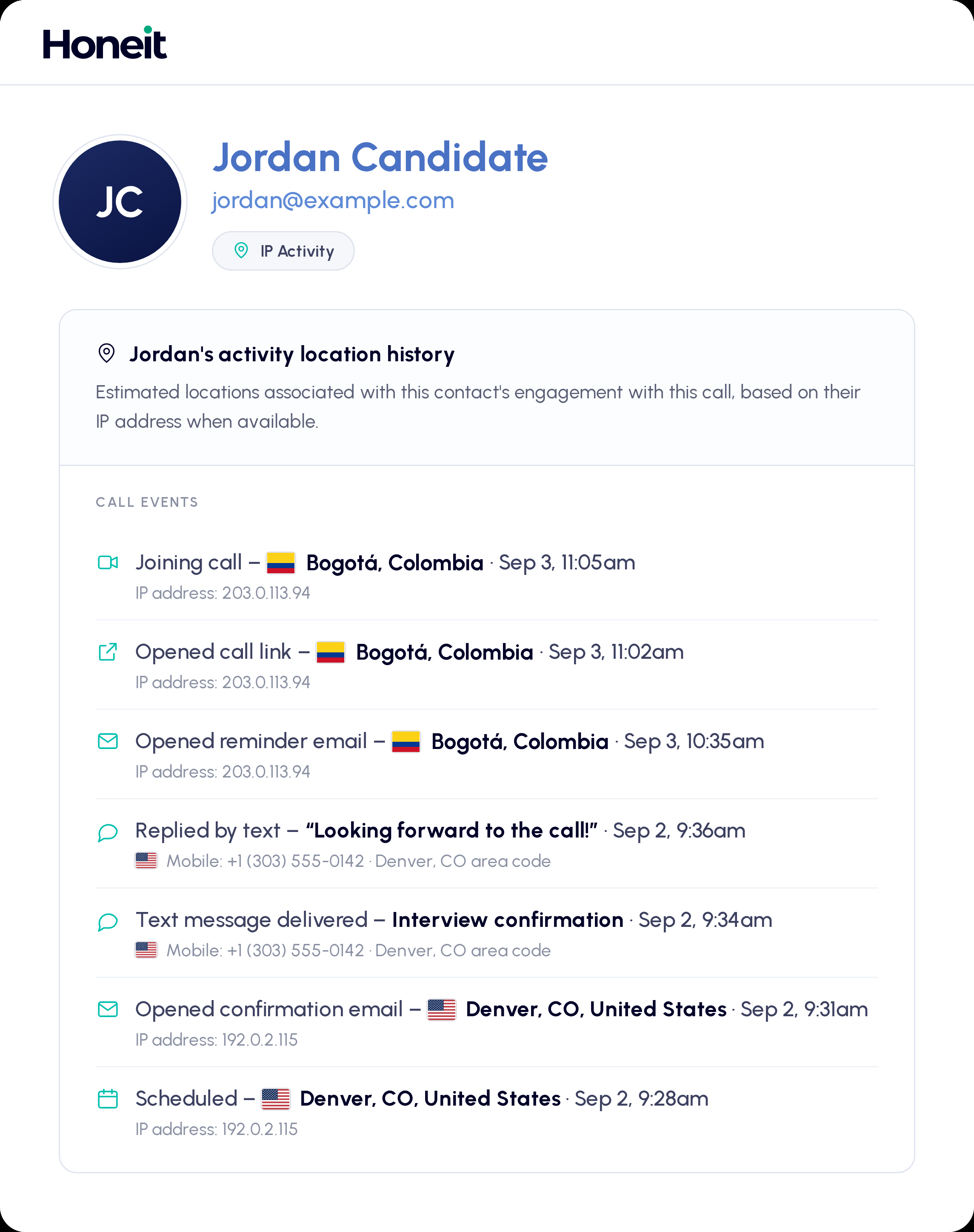
As soon as a call is booked, View IP Activity shows the estimated location and time zone of the scheduling event, right next to the phone number on file. You have a first data point before the conversation starts.
The location panel sits beside your questions and notepad. When the candidate joins, a pop-up in the corner tells you where they are joining from.
The full history stays on the candidate record, so a second or third conversation can be checked against the first without digging through calendars and email.
Locations are estimated from IP address when available. Useful context, not proof. Candidates travel, work remotely, and use networks that route elsewhere.
See the full platform →Before the call
Make it required on every scheduling link. This is the foundation for everything else. It lets you cross-check time zones, send a verification text, and gives you a second channel to reach the candidate.
Scheduling links can collect more than a name. Ask about citizenship or visa status upfront. If the role has strict requirements, it saves you and the candidate a call.
Ask candidates to acknowledge they will personally participate, with no AI-generated answers and no real-time coaching. Ground rules from day one.
Open Call Details and turn both toggles on. Enabling video leaves it optional. Recommending it makes video the default the candidate joins with, so being on camera is the expectation rather than a request you make mid-interview.
During the call

The location panel sits beside your questions and notepad. A mismatch is not proof of anything, candidates travel and work remotely, but it is worth a question.
Send a short code to the candidate's number mid-interview with in-call text and ask them to read it back. Ten seconds confirms the number on file belongs to the person on the call.
Ask candidates to join with video on where it fits your process. Once the interview starts, capture a screenshot and paste it into the notepad as a reference for later rounds.
Ask candidates to share their screen during technical or skills-based interviews. You see how they approach the work in real time, with more context on how the task gets done.
If a response feels inconsistent, drop a marker on the timeline and keep the conversation moving. You can revisit those exact moments with a critical ear once the call is complete.
After the call
Share audio highlights from your screen with the hiring manager before their interview. A quick listen gives them a reference point to compare with the candidate in later rounds, so if the person on the second call sounds like someone else, they will notice it themselves.
Candidate experience
The goal is not to interrogate anyone. These checks work best when they feel like a normal part of the interview, not an accusation.
Set expectations upfront, such as joining with video on or being ready to share a screen. When candidates know what is coming, verification feels routine and the conversation stays where it belongs.